tutorial
Build a Secure VoIP Lab: Asterisk with SRTP and TLS
Voice over IP is easy to stand up and easy to eavesdrop on when it is left unencrypted. This tutorial builds a small lab where you place a call twice: once over plain RTP, and once over SRTP media with TLS-protected signaling. Then you capture both in Wireshark and hear the difference for yourself.
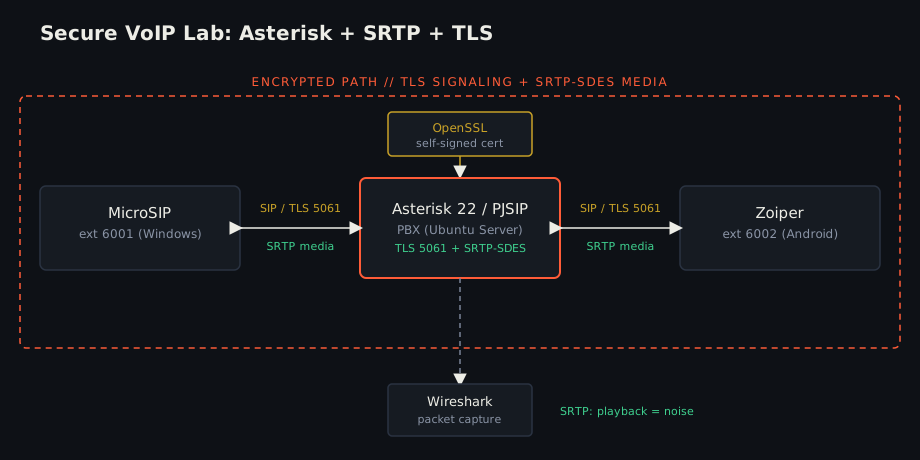
What you will build
- An Asterisk PBX with two extensions,
6001and6002. - A baseline call over SIP/UDP with plain RTP.
- A secure call over SIP/TLS with SRTP-SDES media.
- A side-by-side Wireshark comparison of the two captures.
Prerequisites
- Ubuntu Server 22.04 running Asterisk 22 with PJSIP (a VirtualBox VM in bridged mode works well, so it shares the LAN).
- Two softphones on the same network: MicroSIP (Windows) as
6001and Zoiper (Android) as6002. - Wireshark and OpenSSL on your host.
All devices must reach the server. Confirm with ping <asterisk-ip>.
Step 1: Baseline RTP transport
Define a plain UDP transport in pjsip.conf:
[transport-udp]
type=transport
protocol=udp
bind=0.0.0.0:5060
Add extension 6001 (repeat the same pattern for 6002):
[6001]
type=endpoint
context=from-internal
disallow=all
allow=ulaw
transport=transport-udp
auth=auth6001
aors=6001

[auth6001]
type=auth
auth_type=userpass
username=6001
password=CHANGE_ME_6001

[6001]
type=aor
max_contacts=1
Create the dialplan in extensions.conf:
[from-internal]
exten => 6001,1,Dial(PJSIP/6001,30)
 same => n,Hangup()
exten => 6002,1,Dial(PJSIP/6002,30)
 same => n,Hangup()
Restart and confirm both endpoints register:
sudo systemctl restart asterisk
sudo asterisk -rvvv
pjsip show endpoints
Point MicroSIP and Zoiper at the server over UDP with encryption disabled,
then place a call 6001 -> 6002.
Step 2: Capture the plain RTP call
Start a Wireshark capture on the call interface, place the call, then stop.
Filter with rtp, then open:
Telephony -> RTP -> RTP Streams -> Play Streams
The conversation plays back clearly. Plain RTP gives the media no
confidentiality: anyone who obtains the capture can reconstruct the audio. Save
it as rtp_unencrypted.pcapng.
Step 3: Generate a TLS certificate
For a lab, a self-signed certificate is enough:
sudo mkdir -p /etc/asterisk/keys
sudo openssl req -x509 -newkey rsa:4096 -nodes \
  -keyout /etc/asterisk/keys/asterisk.key \
  -out /etc/asterisk/keys/asterisk.crt \
  -days 365 -subj "/CN=asterisk.local"
Step 4: Enable TLS and SRTP
Add a TLS transport:
[transport-tls]
type=transport
protocol=tls
bind=0.0.0.0:5061
cert_file=/etc/asterisk/keys/asterisk.crt
priv_key_file=/etc/asterisk/keys/asterisk.key
method=tlsv1_2
Switch each endpoint to TLS and require encrypted media:
[6001]
type=endpoint
context=from-internal
disallow=all
allow=ulaw
transport=transport-tls
media_encryption=sdes
direct_media=no
auth=auth6001
aors=6001
Restart Asterisk:
sudo systemctl restart asterisk
Step 5: Configure the softphones
- MicroSIP: server
IP:5061, transport TLS, media encryption Mandatory SRTP. - Zoiper: host
IP:5061, transport TLS, Enable SRTP.
Both accounts should return to Registered.
Step 6: Verify the secure setup
sudo asterisk -rvvv
pjsip show endpoint 6001
pjsip show transports
You want to see:
Transport        : transport-tls
Media Encryption : sdes

transport-tls    tls    0.0.0.0:5061
transport-udp    udp    0.0.0.0:5060
Step 7: Capture the secure call
Capture again while placing 6001 -> 6002. Confirm the signaling is protected
with the filter tls or tcp.port == 5061.
The media will not show up under the rtp filter directly. Find it via:
Statistics -> Conversations -> UDP
Select the media conversation, use Decode As -> RTP, then try RTP Streams
-> Play Streams. This time the audio is only noise. Note that "Decode As RTP"
just forces Wireshark to parse the packets as RTP; it does not decrypt SRTP. Save
it as srtp_encrypted.pcapng.
Results
| Aspect | RTP (baseline) | SRTP + TLS |
|---|---|---|
| SIP signaling | UDP 5060 | TLS 5061 |
| Media | RTP | SRTP-SDES |
| Audio playback from capture | Clear | Noise |
| Eavesdropping risk | High | Much lower |
The call works in both cases, so encryption does not break VoIP. The difference is entirely in what someone with a packet capture can recover.
Security notes
- Self-signed certificates are fine for a lab. For anything real, use a certificate from a trusted CA.
- Never capture or intercept traffic you do not own or have permission to test.
- Replace every
CHANGE_ME_*placeholder with a strong local password, and keep real credentials out of any repository.
The full configs, captures, and report for this lab live in the project repo: SRTP-VoIP-Security-Implementation.
// RELATED FILES
notes/2 min read
tutorial/1 min read
How to Look Like a Pro Hacker in Front of Non-Techie Friends